Terraform Provider
The Phase Terraform Provider allows you to securely manage and retrieve secrets directly from your Terraform configurations. This integration enables you to incorporate secure secret management into your infrastructure-as-code workflows.
Prerequisites
- Terraform 0.13.x or later
- Sign up for the Phase Console and create an App.
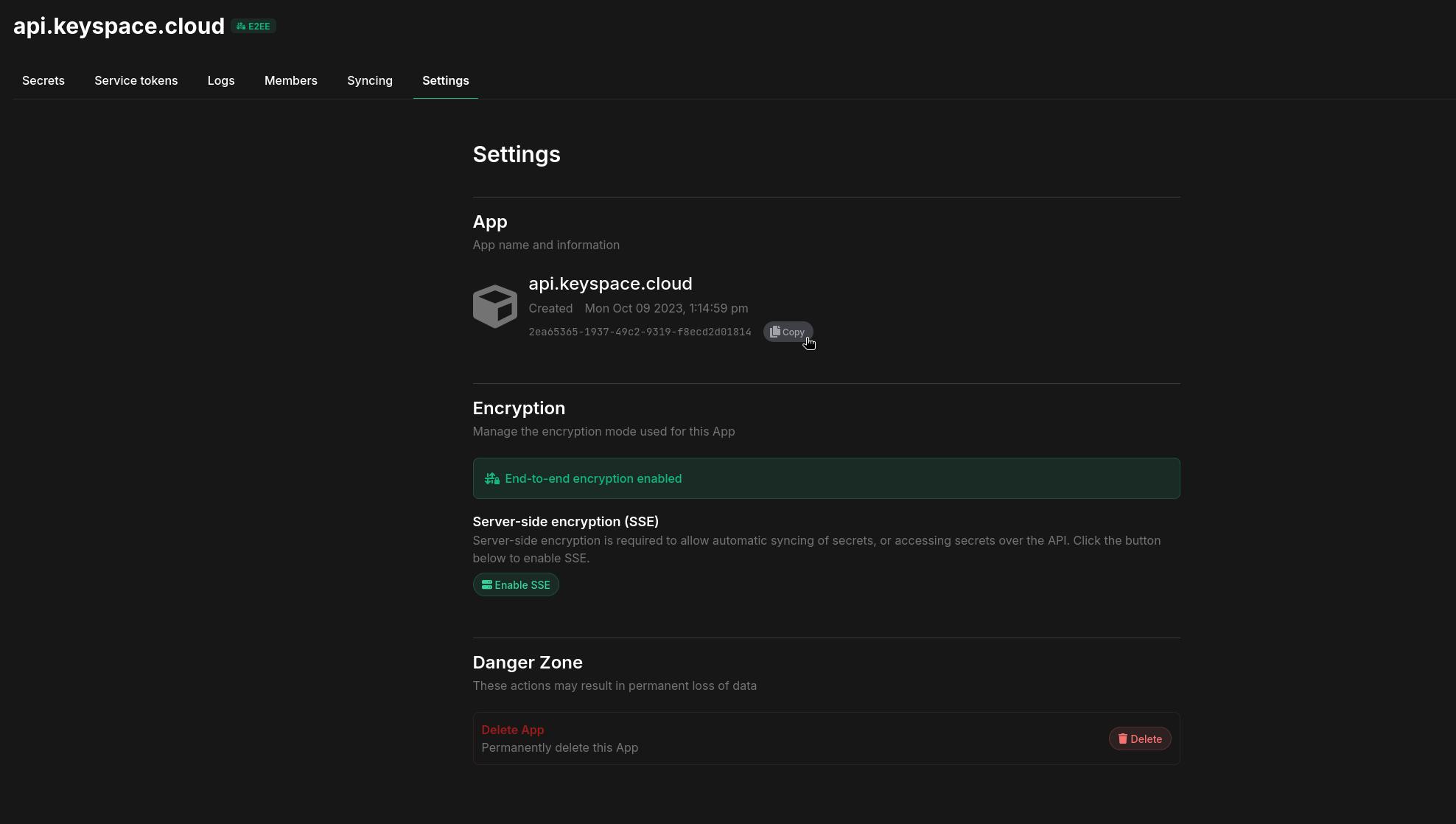
- Enable Server-side Encryption (SSE) for the App from the Settings tab.
Demo
A quick demo showing creating 100 secrets inside of production environment across various paths via the terraform provider:
Preparation
-
Create a new Phase Service Account Token or a Personal Access Token (PAT). If you intend to retrieve values of personal secret overrides set in your account via the Phase Console or the Phase CLI, be sure to use a Personal Access Token (PAT).
-
Fetch your Phase Application ID (AppID) by going to your application settings in the Phase Console, hovering over UUID under the App section and clicking the
Copybutton:
Step 1: Install the Provider
To use the Phase provider in your Terraform configuration, add the following Terraform block to your configuration:
terraform {
  required_providers {
    phase = {
      source  = "phasehq/phase"
      version = "0.2.0" // replace with latest version
    }
  }
}
You can get the latest version of Phase from the official Terraform Registry or GitHub releases.
Step 2: Configure the Provider
To configure the provider, you need to provide your Phase API credentials. We recommend using environment variables for sensitive information:
provider "phase" {
  phase_token = "pss_service:v1:..." # or "pss_user:v1:..." // A Phase Service Token or a Phase User Token (PAT)
  // Alternatively supply a PHASE_TOKEN environment variable
}
If you are using a self-hosted instance of Phase, you can specify the API host using the host argument in the provider configuration:
provider "phase" {
  host                 = "https://phase.example.io"
  skip_tls_verification = true # Optional, if your Phase instance is using a self-signed certificate, you can set this to true to skip TLS verification.
  phase_token          = "pss_service:v1:..." # or "pss_user:v1:..." // A Phase Service Token or a Phase User Token (PAT)
}
You can provide the phase_token at runtime through the interactive menu or as an environment variable using any of the following: PHASE_TOKEN, PHASE_SERVICE_TOKEN, PHASE_PAT_TOKEN.
Step 3: Using the Provider
Fetching Secrets
To fetch secrets from Phase, use the phase_secrets data source:
data "phase_secrets" "all" {
  env    = "development" // The environment to fetch secrets from.
  app_id = "your-app-id" // The ID of the Phase application to fetch secrets from.
  path   = "" // Use an empty string to fetch all secrets in the application.
}

output "all_secret_keys" {
  value     = data.phase_secrets.all.secrets
  sensitive = true
}
☝️ This will fetch all secrets stored inside your Phase application in the development environment.
Example:
terraform {
  required_providers {
    phase = {
      source = "phasehq/phase"
      version = "0.2.0"
    }
  }
}

provider "phase" {
  skip_tls_verification = true
  host = "https://phase.internal.acme.com"
}

data "phase_secrets" "all" {
  env    = "production"
  app_id = "907549ca-1430-4aa0-9998-290525741005"
  path   = ""
}

output "all_secret_keys" {
  value     = data.phase_secrets.all.secrets
  sensitive = true
}
Fetching Secrets from a Specific Path
To fetch all secrets under a specific path:
data "phase_secrets" "path_secrets" {
  env    = "production"
  app_id = "your-app-id"
  path   = "/backend"
}

output "backend_secret_keys" {
  value     = data.phase_secrets.path_secrets.secrets["JWT_SECRET"]
  sensitive = true
}
Example:
terraform {
  required_providers {
    phase = {
      source = "phasehq/phase"
      version = "0.2.0"
    }
  }
}

provider "phase" {
  skip_tls_verification = true
  host = "https://phase.internal.acme.com"
}

data "phase_secrets" "all" {
  env    = "production"
  app_id = "907549ca-1430-4aa0-9998-290525741005"
  path   = "/folder/path"
}

output "all_secret_keys" {
  value     = data.phase_secrets.all.secrets
  sensitive = true
}
☝️ This will fetch the JWT_SECRET secret from the /backend folder inside your Phase application in the production environment.
Fetching a Single Secret
To fetch a specific secret:
data "phase_secrets" "single" {
  env    = "development"
  app_id = "your-app-id"
}

output "database_url" {
  value     = data.phase_secrets.single.secrets["DATABASE_URL"]
  sensitive = true
}
☝️ This will fetch the value of the DATABASE_URL secret from your Phase application in the development environment.
Example:
terraform {
  required_providers {
    phase = {
      source = "phasehq/phase"
      version = "0.2.0"
    }
  }
}

provider "phase" {
  host = "https://phase.internal.acme.com"
}

data "phase_secrets" "single" {
  env    = "production"
  app_id = "907549ca-1430-4aa0-9998-290525741005"

}

output "database_url" {
  value     = data.phase_secrets.single.secrets["DATABASE_URL"]
  sensitive = true
}
Creating Secrets
resource "phase_secret" "example" {
  app_id  = "8b94fe5c-ea7d-4091-9087-e0e03089bd47"
  env     = "production"
  key     = "DATABASE_URL"
  path    = "/database/pgsql"
  comment = "AWS RDS PostgreSQL database creds"
  tags    = ["database", "RDS"]  // Tags must be pre-created in the Phase Console
  value   = "postgres://${USER}:${PASSWORD}@${HOST}:{PORT}/${DATABASE}"
}
To be able to assign tags to secrets, the tags must already be created in the Phase Console beforehand.
Example:
terraform {
  required_providers {
    phase = {
      source  = "phasehq/phase"
      version = "0.2.0"
    }
    random = {
      source  = "hashicorp/random"
      version = "3.6.0"
    }
  }
}

provider "phase" {
  host = "https://internal.phase.acme.com"
}

# Generate random values for secrets
resource "random_bytes" "secret_1" {
  length = 32
}

resource "random_bytes" "secret_2" {
  length = 64
}

resource "phase_secret" "terraform_secret_1" {
  app_id  = "8b94fe5c-ea7d-4091-9087-e0e03089bd47"
  env     = "development"
  key     = "TF_SECRET_1"
  value   = random_bytes.secret_1.hex
  path    = "/"
  comment = "Created by Terraform"
  tags    = ["database"]  # Tag must already exist in Phase Console
}

resource "phase_secret" "terraform_secret_2" {
  app_id  = "8b94fe5c-ea7d-4091-9087-e0e03089bd47"
  env     = "production"
  key     = "TF_SECRET_2"
  value   = random_bytes.secret_2.hex
  path    = "/foo-bar"
  comment = "Created by Terraform"
}
Using Secrets in Resources
You can use the fetched secrets in your Terraform configurations like this:
resource "some_resource" "example" {
  database_url   = data.phase_secrets.all.secrets["DATABASE_URL"]
  api_key        = data.phase_secrets.all.secrets["API_KEY"]
  backend_config = data.phase_secrets.all.secrets["BACKEND_CONFIG"]
}
Step 4: Run terraform
Initialize Terraform in the root of your project. This will pull all dependencies and configurations:
terraform init
Run Terraform plan to retrieve secrets from Phase and preview the changes that will be made:
terraform plan
Execute your Terraform workflow:
terraform apply
Step 5: Destroy the resources
To destroy the resources created by the Terraform configuration, run the following command:
terraform destroy
Importing Existing Secrets
You can import existing secrets from Phase into your Terraform state using:
terraform import phase_secret.<resource_name> "<app_id>:<env>:<path>:<key>"
For example:
terraform import phase_secret.imported_secret "907549ca-1430-4aa0-9998-290525741005:production:/database/:DB_HOST"
Secret Versions and Metadata
The provider automatically tracks secret versions and metadata:
resource "phase_secret" "database_url" {
  env    = "production"
  app_id = "your-app-id"
  key    = "DATABASE_URL"
  value  = "postgres://user:password@localhost:5432/db"
  tags   = ["database", "credentials"]  # Tags must already exist in Phase Console
}

output "secret_version" {
  value = phase_secret.database_url.version
}

output "secret_created_at" {
  value = phase_secret.database_url.created_at
}
Personal Secret Overrides
Personal Secret Overrides allow individual users to temporarily override a secret's value for their own use, without affecting the value for other users or systems. Important points to note:
-
User Token Requirement: Personal Secret Overrides require authentication with a Phase User Token (Personal Access Token or PAT). Service tokens do not support this feature.
-
Activation: Personal Secret Overrides must be activated through the Phase Console or the Phase CLI. They cannot be directly triggered or modified through the Terraform provider.
-
Behavior: When active, the Terraform provider automatically uses the overridden value instead of the main secret value when fetching secrets.
-
Visibility: Personal Secret Overrides are only visible and applicable to the user who created them.
Best Practices
- Use variables or environment variables for the Phase token to keep it out of your Terraform configurations.
- Utilize Terraform's
sensitiveargument when outputting or using secret values to prevent accidental exposure. - Be cautious when using
terraform outputcommands, as these may display sensitive information. - Create all necessary tags in the Phase Console before referencing them in Terraform configurations. In the near future, we will add an API to automatically create tags in Terraform.